Developing Cloud-Based Invoicing and POS Agentic Software
I’ve been studying what a polished, cloud-native invoicing and POS product looks like in practice: not just a billing tool, but a full operational system for small businesses, retail stores, restaurants, and service providers.
This post is a teardown of that product shape.
The goal is not to copy a brand. The goal is to understand the architecture, product surfaces, and workflows that make a modern cloud invoicing and POS platform genuinely useful—and then explore how AI agents can automate large parts of it.
What the Product Really Is
At first glance, this category looks like “invoice software.” That is too narrow.
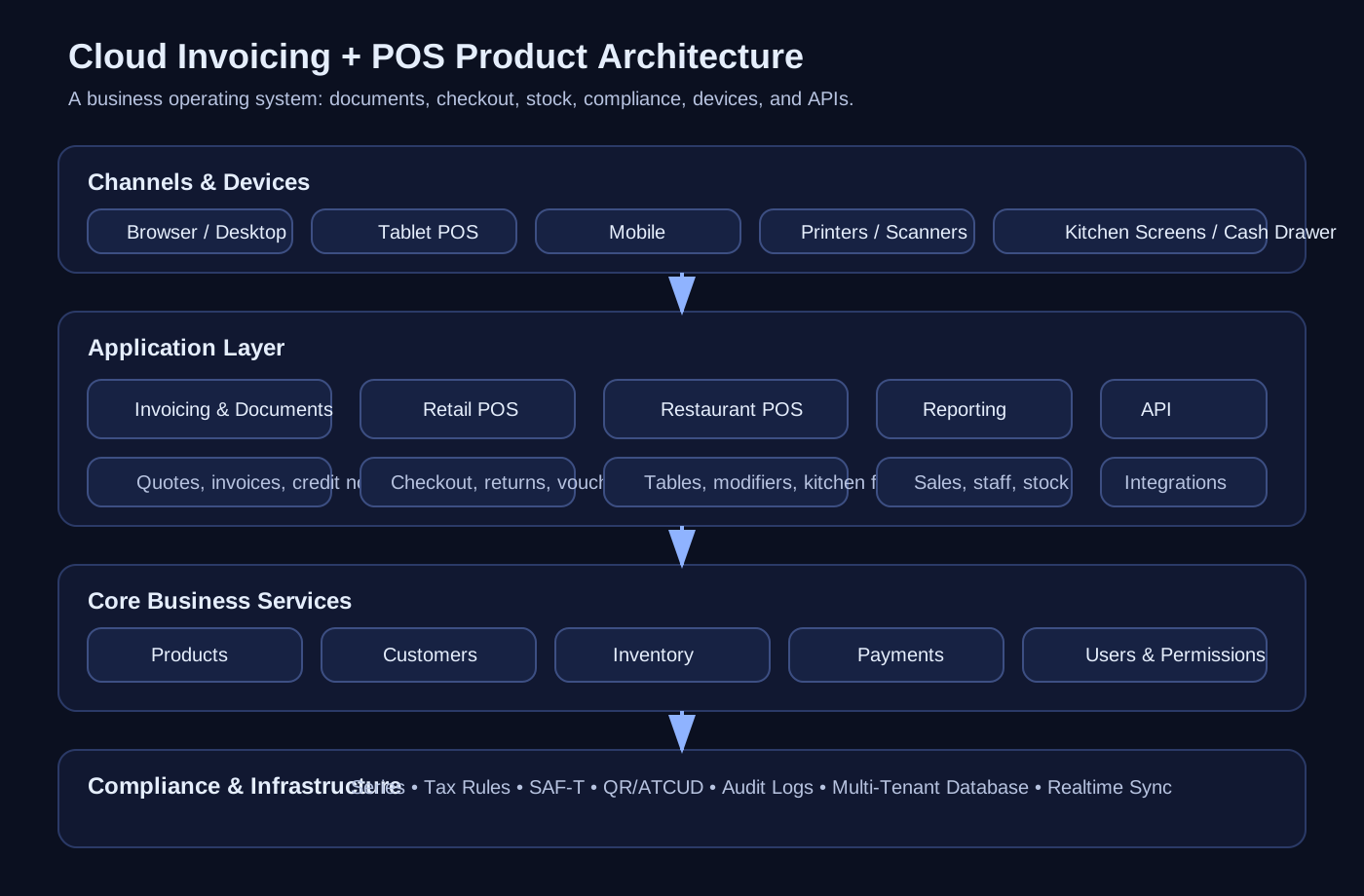
A serious cloud invoicing/POS platform is really a business operating system with five layers:
- Commercial documents — invoices, receipts, credit notes, quotes, transport documents
- Transaction execution — retail checkout, restaurant ordering, table management, split bills, returns
- Operational control — stock, warehouses, suppliers, purchases, cash drawers, users, permissions
- Compliance — tax-certified document issuance, SAF-T exports, QR codes, ATCUD, fiscal reporting
- Distribution — browser, tablet, phone, printer, kitchen screens, external integrations, APIs
That is why these products win. They sit in the middle of daily business operations, not just accounting.
Who It Serves
A modern system in this space usually targets three broad segments.
1. Services and small offices
This segment mostly cares about:
- issuing invoices quickly
- tracking client balances
- generating PDFs and A4 printouts
- handling recurring payments and current accounts
- staying compliant without talking to an accountant every hour
Examples:
- freelancers
- agencies
- clinics
- field services
- small consultancies
2. Retail
Retail needs a faster operational layer:
- barcode scanning
- receipt printing
- fast checkout
- returns and exchanges
- product variants like size/color
- stock control
- multi-store and warehouse support
- multiple concurrent sales terminals
Examples:
- clothing stores
- florists
- electronics shops
- convenience stores
- specialty retail
3. Restaurants, cafés, bars, and food service
This is where the system becomes much more operational:
- room and table layout
- orders sent to kitchen
- bill preview and bill split
- product customization
- transfers between tables
- multiple POS devices synchronized live
- cashier control by payment type
- kitchen displays and ticket printers
Examples:
- restaurants
- cafés
- bars
- takeaway counters
- food trucks
The interesting thing is that all three segments share a core ledger and document model, but each needs a different workflow engine.
The Main Product Surfaces
If I were decomposing the website and application into pages or modules, I’d break it into the following surfaces.
1. Homepage: the value proposition
The home page for this kind of product usually communicates a few core promises:
- issue invoices in seconds
- run from computer, phone, or tablet
- no installation required
- tax-compliant from day one
- works for retail, services, and restaurants
- simple enough for non-technical operators
This is important product positioning.
The best products in this category are sold as:
- simple enough for a cashier or business owner
- broad enough to run a real business
- cloud-based enough to work everywhere
- compliant enough to be trusted
That combination is harder to build than it looks.
2. Pricing page: segmentation strategy
The pricing model usually reveals the product architecture.
Typical packaging looks like this:
- entry tier for invoicing/services
- mid tier for retail POS and local businesses
- higher tier for restaurants and advanced stock operations
What changes between tiers is usually not CPU or storage. It is workflow complexity:
- users and permissions
- POS capability
- stock and warehouse support
- restaurant/table flows
- integrations/API access
- device and terminal scale
That tells you a lot about where value is created.
Feature Teardown by Product Area
Invoicing and document engine
This is the foundation.
A serious document engine should support:
- invoices
- simplified invoices / receipts
- invoice-receipts
- credit notes
- quotes / budgets
- transport guides
- electronic invoices as PDFs
- A4 and thermal receipt formats
- digital signing where required
The trick is not merely generating documents. The trick is maintaining:
- legal numbering sequences
- tax calculation correctness
- printable layout templates
- customer/account mappings
- auditability
- exportability for compliance
A clean internal model here usually looks like:
DocumentDocumentLinePartyTaxRulePaymentSeriesFiscalEvent
That model ends up powering everything else.
POS workflow engine
POS is not just “create invoice faster.” It is a separate execution layer.
For retail, the platform should support:
- fast item search and favorites
- barcode scanning
- cash drawer integration
- receipt and A4 printing
- returns, cancellations, and exchanges
- discount tickets / vouchers
- multiple simultaneous sales
- payment methods such as cash, debit, credit, MBWay, etc.
- end-of-day cash control
The UX requirements are different from invoicing.
In a POS screen, the operator wants:
- fewer clicks
- larger touch targets
- minimal typing
- resilient printer flows
- extremely fast product lookup
That implies a dedicated frontend architecture, not just a “POS mode” bolted on to an admin panel.
Restaurant operations
Restaurant POS is almost a product of its own.
Required capabilities usually include:
- room/area configuration
- table layouts
- open ticket management
- composed menus
- modifiers and customizations
- transfer items between tables
- partial payment
- split bills
- kitchen order printing or display routing
- live sync across waiters’ devices
The system needs to represent more than a sale. It needs to represent an evolving order state.
A restaurant order tends to move through states like:
- table opened
- items added
- modifiers attached
- kitchen ticket sent
- items served
- partial payment received
- ticket closed
That is a workflow engine, not a static billing form.
Stock, warehouses, purchases, and suppliers
The moment a business has physical products, invoicing alone is not enough.
Core inventory capabilities include:
- stock control
- multi-store / warehouse support
- lot tracking where needed
- purchases and supplier records
- stock movement history
- variable products (size, color, other attributes)
- availability visibility by location
This part matters because it connects front-office sales to back-office operations.
Without it, the system cannot answer useful business questions:
- What is actually in stock right now?
- Which store is selling best?
- Which supplier should be reordered from?
- Which variants are underperforming?
- What products are often returned?
Payments and cash control
Another underestimated module.
The product should support:
- multiple payment types
- payment breakdown by method
- current accounts
- payments on account / delayed payments
- cash opening and closing
- movement logs
- monthly payment reporting by type
This matters both for operations and for trust.
When the owner asks, “How much came in via card vs cash today?” the answer needs to be instant and accurate.
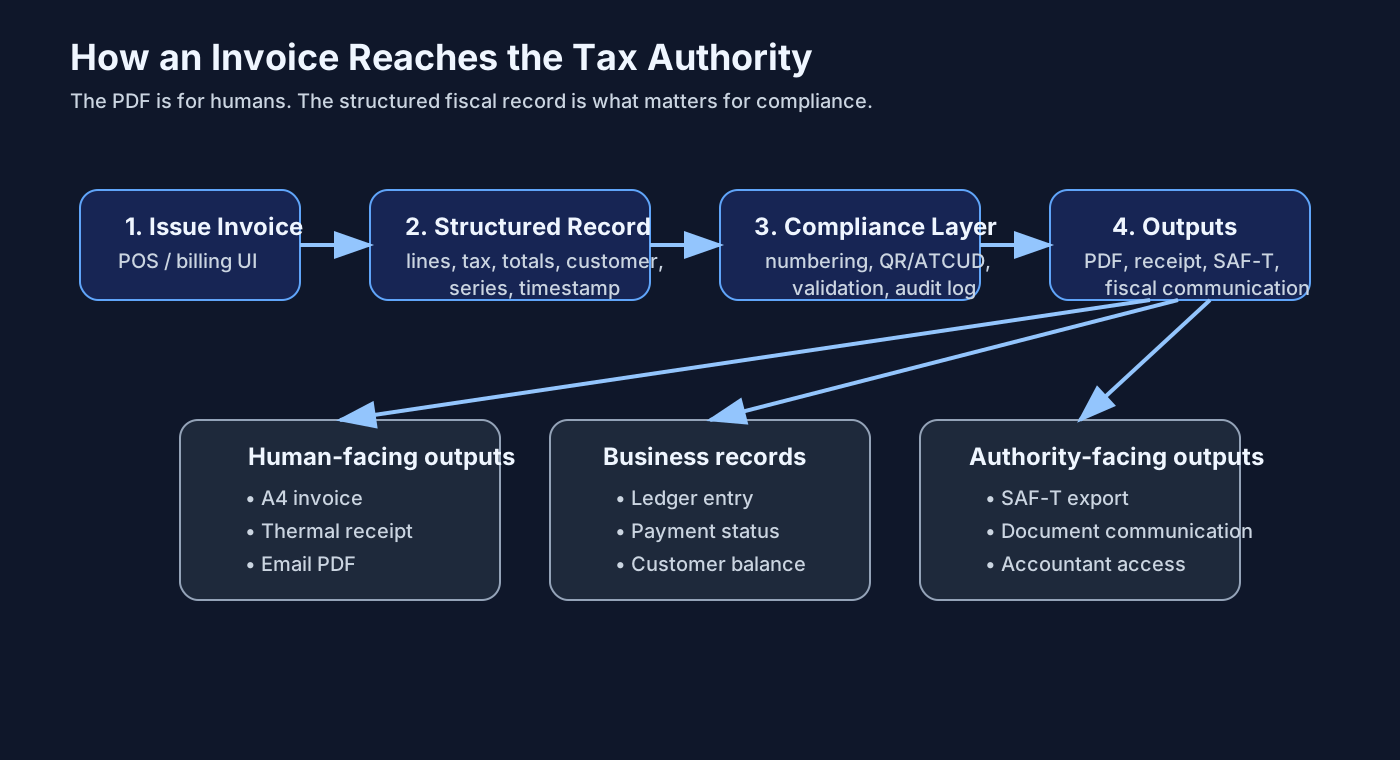
Compliance and tax operations
In regulated markets, compliance is not a nice extra. It is table stakes.
Typical requirements include:
- certified software status
- SAF-T export
- QR code support
- ATCUD or equivalent document identifiers
- automatic communication/listing of fiscal documents
- tax maps and withholding support
- audit-friendly logs
This is one of the biggest moats in the category.
A lot of teams can build a slick POS UI. Far fewer can sustain country-specific fiscal correctness over time.
Devices and hardware
This category only works if software and hardware cooperate.
Expected compatibility usually includes:
- thermal printers
- A4 printers
- USB, Wi-Fi, and Bluetooth printing paths
- ESC/POS support
- barcode scanners
- cash drawers
- weighing scales
- automated payment machines / change dispensers
- kitchen printers or kitchen displays
This creates a product truth that software-only founders often underestimate:
hardware support is part of the UX.
If printing is flaky, the product feels broken even if the backend is beautifully designed.
Multi-device and cloud access
The best products in this category are positioned as “available everywhere.”
That usually means:
- browser-first usage
- desktop compatibility across operating systems
- tablet workflows for counters and tables
- mobile access for on-the-go billing
- synchronized state between devices
- no install requirement for the core experience
Architecturally, this implies:
- reliable server-side state
- session-aware permissions
- idempotent document creation flows
- resilient syncing for multiple devices hitting the same resources
Users, roles, and permissions
Small businesses often start with one operator and then expand.
The system therefore needs:
- multiple users
- permission levels
- cashier vs manager separation
- commission assignments in some segments
- device/session traceability
This becomes especially important for:
- fraud prevention
- cash control
- audit trails
- shift-based operations
Reporting and analytics
The reporting layer tends to be where owners spend management time.
Useful questions include:
- what sells most by day or hour?
- which employee is most productive?
- which payment method dominates?
- what stock is low?
- what margin is implied by supplier and sales data?
- which store or terminal is underperforming?
A good platform turns transactions into answers quickly.
That often means combining:
- operational dashboards
- exportable reports
- real-time summaries
- drill-down by product, user, store, date, payment type
Integrations and API
Once a business grows, the product has to connect outward.
Natural integration surfaces include:
- e-commerce platforms
- accounting tools
- payment systems
- logistics and transport tools
- ERP connectors
- reporting/BI pipelines
- external app ecosystems
If the product exposes an API, it stops being just an application and starts becoming infrastructure.
How I Think They Built It
Without seeing internal source code, the product shape strongly suggests a fairly standard but well-executed SaaS architecture.
1. Multi-tenant core
This kind of system almost certainly uses a tenant-aware data model:
- account
- subscription/plan
- business entity
- store / POS terminal
- user / role
- documents / orders / payments
Every major entity is tenant-scoped.
2. Shared core, vertical workflow modules
The same platform likely serves multiple business types through a common foundation:
Common core:
- customers
- products
- tax rules
- documents
- payments
- reports
- permissions
Vertical modules:
- retail POS
- restaurant POS
- services invoicing
- stock and warehouse flows
That is the right tradeoff. One ledger, many workflow skins.
3. Browser-first frontend with device integrations
The public positioning suggests a browser-first product with optional native or device companion apps for:
- mobile support
- printer integration
- scanner support
- scale and hardware bridges
This is a pragmatic way to stay cross-platform while still handling real-world peripherals.
4. Compliance as a first-class backend concern
The fiscal features imply backend services responsible for:
- certified numbering/series logic
- tax calculations
- document finalization rules
- export generation
- audit/event logging
- country-specific compliance handlers
This is not something to leave to the frontend.
5. Real-time synchronization for restaurant and multi-POS usage
The restaurant workflows strongly suggest near-real-time state propagation for:
- open tables
- new kitchen orders
- payment state changes
- terminal synchronization
Whether done with WebSockets, SSE, polling, or hybrid sync, the product clearly needs live coordination.
The Product Insight That Matters Most
The real magic is not any one feature.
It is that the product compresses an entire business day into one software loop:
- create product
- sell product
- print ticket
- track stock
- record payment
- close cash
- report taxes
- review performance
That loop is what makes the product sticky.
If you want to build something in this category, do not start by thinking “invoice generator.” Start by thinking “daily operating system for commerce.”
Where AI Actually Fits
This is where things get interesting.
Most software in this category still assumes the human is the workflow orchestrator. The software waits for clicks.
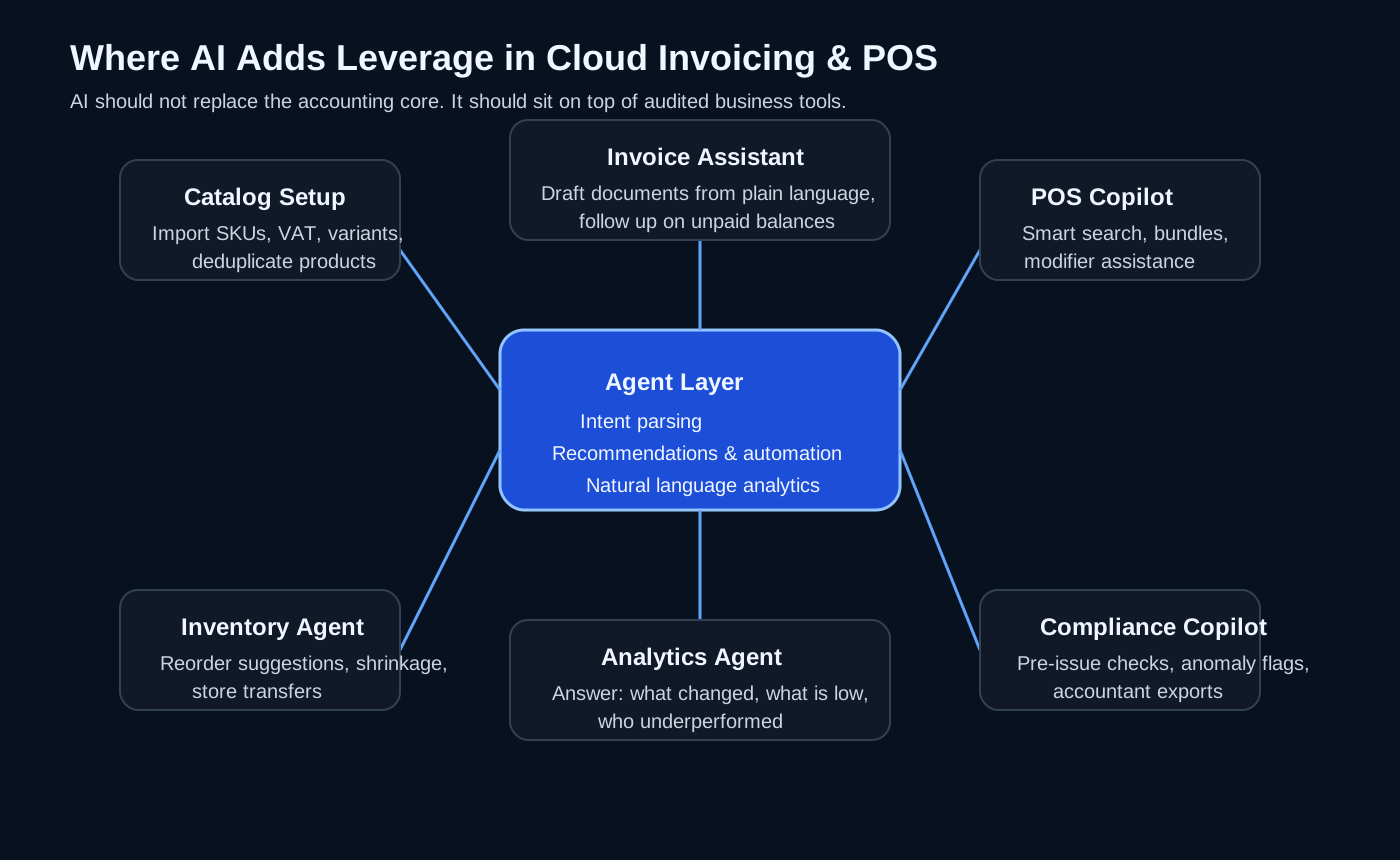
An agentic version should do more than add a chatbot to the sidebar.
It should actively reduce operational work across the whole stack.
AI Automation Opportunities by Module
1. Product and catalog setup
Setting up products, taxes, variants, and pricing is tedious.
AI can help by:
- importing supplier catalogs from PDFs, spreadsheets, or emails
- extracting product names, SKUs, VAT classes, sizes, colors, and images
- normalizing messy product data
- suggesting categories and tags
- detecting duplicates and conflicting prices
- generating multilingual product descriptions
This alone can remove hours of onboarding friction.
2. Invoice and document assistance
Instead of manually creating every document, an agent can:
- draft invoices from plain-language instructions
- convert a quote into an invoice automatically
- detect missing tax IDs or suspicious line items
- chase overdue invoices with polite follow-ups
- generate customer-ready payment reminders
- reconcile attached proofs of payment with open balances
Example:
“Generate an invoice for client X for 3 hours of consulting, 2 design revisions, due in 15 days, and email the PDF.”
That should be a native action.
3. POS copilots for staff
At the POS layer, AI should not get in the way of speed. It should help at the edges.
Useful interventions include:
- smart search when the cashier only remembers half a product name
- suggesting common bundles or upsells
- flagging mismatch between scanned item and selected variant
- explaining errors in plain language
- helping new staff learn the system faster
For restaurants:
- convert waiter free-text into structured orders
- map spoken modifiers into product options
- detect likely kitchen routing mistakes
- suggest bill split options based on ordering history at the table
4. Inventory automation
Inventory is fertile ground for agents.
AI can:
- forecast replenishment needs
- spot slow-moving stock
- identify suspicious shrinkage patterns
- recommend transfer between stores
- draft purchase orders to suppliers
- correlate stockouts with missed revenue opportunities
This turns stock from a passive ledger into an active planning system.
5. Reporting that speaks human
Owners do not want dashboards for the sake of dashboards. They want answers.
Instead of forcing them to click around filters, let them ask:
- “Why were sales down on Tuesday?”
- “Which products should I reorder this week?”
- “Which cashier processed the most returns?”
- “What changed compared to last month?”
The AI layer can translate natural language into analytics queries, then summarize the results with context.
6. Compliance copilots
This is quietly one of the highest-value applications.
AI can:
- check documents for fiscal completeness before issuance
- flag risky anomalies
- explain compliance errors in non-accountant language
- prepare accountant-ready exports
- detect unusual tax mappings or duplicate numbering patterns
This does not replace certified logic. It wraps certified logic with guidance.
7. Back-office operations agents
An agentic back office can watch the system continuously and act.
Examples:
- if stock for a fast-moving item drops below threshold, draft a purchase order
- if a shift cash discrepancy appears, notify the manager with the likely cause
- if a supplier invoice arrives by email, extract it and match it against purchases
- if a customer has overdue invoices, prepare a follow-up sequence
- if a printer repeatedly fails, suggest device troubleshooting steps
Now the software is no longer a dashboard. It becomes an active operations assistant.
What an Agentic Architecture Might Look Like
If I were designing this from scratch, I’d keep the system in three layers.
Layer 1: Deterministic core
This layer must remain strict.
- documents
- taxes
- stock movements
- payments
- fiscal exports
- permissions
- accounting invariants
No LLM should be allowed to “wing it” here.
Layer 2: Action tools
Expose the core system through safe, audited tools:
create_invoiceissue_credit_notecreate_purchase_ordermove_stockclose_cash_sessionsend_kitchen_ticketgenerate_saft_exportquery_sales_report
This is how agents act safely.
Layer 3: Agentic orchestration
Then place AI agents on top for:
- intent parsing
- recommendation generation
- anomaly detection
- workflow automation
- natural language analytics
- operator assistance
The agent should suggest, prepare, and automate—but only through controlled tools.
That design gives you the upside of AI without destroying trust.
The Hard Parts of Building This
This category looks straightforward from the outside. It is not.
The hard parts are:
- legal compliance that changes over time
- printers and hardware weirdness
- latency under checkout pressure
- concurrency across devices and terminals
- getting restaurant workflows truly right
- handling returns and corrections safely
- user experience for non-technical operators
- support burden from edge-case business setups
The teams that succeed here are usually the teams that care deeply about boring details.
That is not an insult. That is the moat.
My Take
The future version of cloud invoicing/POS software is not just cloud-native. It is agent-native.
The winning product will combine:
- reliable fiscal and transaction infrastructure
- elegant multi-device workflows
- deep vertical support for retail, services, and hospitality
- an AI layer that actively reduces admin, setup, reporting, and operational friction
In other words:
The best invoicing and POS software will stop being a system people use, and start becoming a system that works alongside them.
That is the direction I find most interesting: not replacing the checkout, not replacing the accountant, not replacing the owner—but building software that quietly handles the operational burden around them.
And that is exactly where agentic systems belong.
Enjoy Reading This Article?
Here are some more articles you might like to read next: